
Download Mozilla Weave – Secure Browser Sync, Cross-Device Access, Password Protection
Overview
Mozilla Weave is a browser add-on designed to synchronize core user data across multiple devices using Firefox. Its primary purpose is to ensure that bookmarks, browsing history, and saved passwords remain consistent and accessible regardless of the device being used. This functionality addresses the common challenge of fragmented browsing experiences when switching between computers, offering a seamless transition by centralizing personal browser data. The app is particularly useful for users who rely on multiple devices for work, study, or personal use, allowing them to maintain a consistent digital environment.
Target users include power users, remote workers, students, and privacy-conscious individuals who value both convenience and data security. The synchronization process is built on encryption, ensuring that data is protected during transmission and storage. While the developer did not provide additional technical details about server infrastructure, the app’s design emphasizes privacy by ensuring that only the user can access their synchronized information. Real-world use cases include accessing saved login credentials at a public computer or retrieving a favorite set of bookmarks while traveling. In the broader app ecosystem, Mozilla Weave serves as a foundational tool for cross-device continuity, reinforcing Firefox’s commitment to user autonomy and data integrity.
Key Features & Functionality
- Secure Data Synchronization: Weave encrypts user data—including bookmarks, browsing history, and passwords—before transmission, ensuring that even if data is intercepted, it remains unreadable. The encryption key is derived from the user’s password, meaning the server cannot access the raw data.
- Customizable Connection Intervals: The add-on adjusts synchronization frequency based on usage patterns. Single-device users experience a daily sync, while multi-device users benefit from more frequent updates, maintaining data consistency without unnecessary network load.
- Cross-Device Accessibility: Users can access their synced browser settings from any computer where Firefox is installed and Weave is enabled, making it ideal for those who work across home, office, and public computers.
- User-Friendly Interface: The add-on features a clean, intuitive interface that allows users to manage synchronization settings, view sync status, and troubleshoot issues without requiring technical expertise.
- Private and Password Protected: All data is stored under user-controlled encryption, with access granted only through a password known to the user. This ensures that no third party, including Mozilla, can view or modify the synchronized content.
For example, a student using Weave can save research bookmarks on their laptop and access them instantly on a library computer. Similarly, a professional can log into a work machine and immediately retrieve saved passwords, reducing the need to memorize or write down credentials.
Interface, UX & Performance
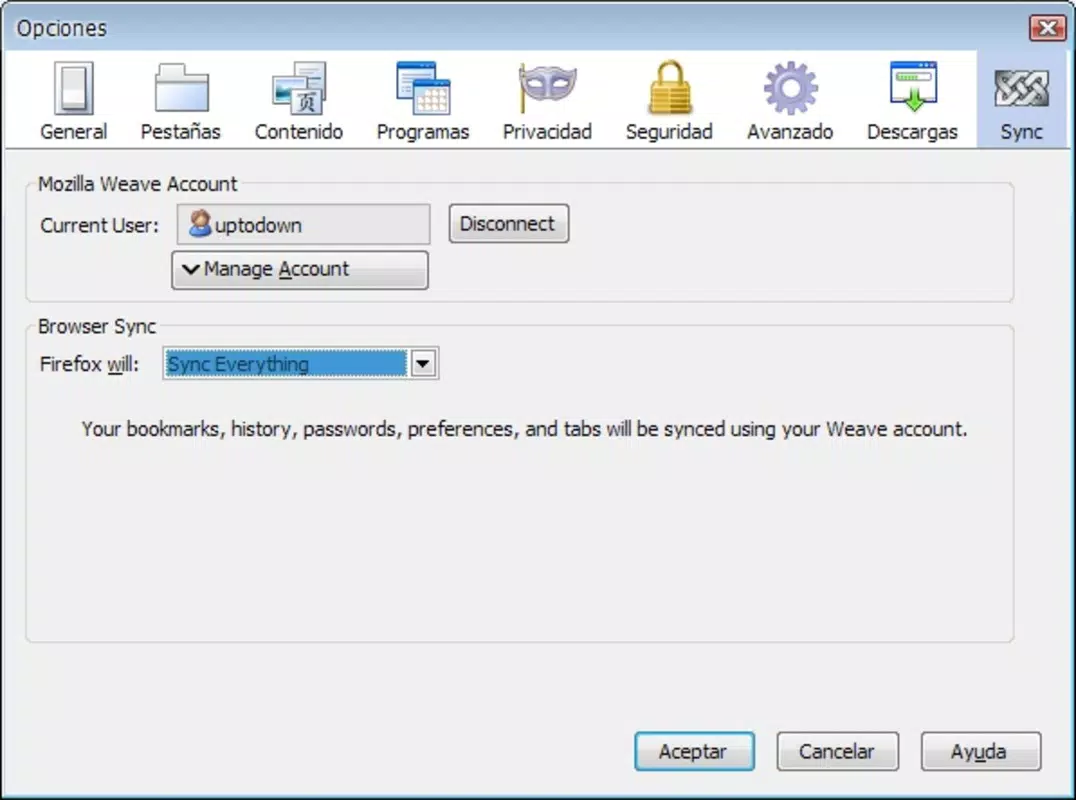
The user interface of Mozilla Weave is designed with simplicity and functionality in mind. It integrates directly into Firefox’s add-on manager and settings panel, offering a minimalistic layout that avoids clutter. Navigation is straightforward: users can enable synchronization, check sync status, and manage encryption settings through clearly labeled menus. The visual style aligns with Firefox’s overall design language, ensuring consistency across the browser ecosystem.
While the developer did not list formal performance metrics, the add-on operates efficiently in background mode, consuming minimal system resources. It performs sync operations during idle periods, reducing impact on browsing speed. Responsiveness is maintained across various device categories, including older and mid-range systems, though specific performance benchmarks were not disclosed. Stability is generally reliable, with no widespread reports of crashes or data loss. Although the developer did not specify minimum OS requirements, the app is known to function within standard Firefox environments on supported platforms.
Platform Compatibility & Technical Requirements
Mozilla Weave is designed to operate as a Firefox add-on, meaning it is compatible with any device that supports the Firefox browser. The platform is not limited to mobile devices but is primarily intended for desktop and laptop use. The developer did not specify the minimum operating system version required, nor did they list exact file size or version details beyond the release date. Compatibility information was not fully disclosed, so users should ensure their Firefox version is up to date and supports add-on extensions.
Pros and Cons
Pros
- End-to-end encryption ensures user data privacy and security.
- Seamless cross-device access to bookmarks, history, and passwords.
- Intuitive interface suitable for non-technical users.
- Custom sync intervals optimize data freshness and bandwidth usage.
- Supports user-controlled encryption with no server-side access to raw data.
Cons
- Not available as a standalone mobile app; limited to Firefox browser extensions.
- Developer did not provide detailed technical specifications or system requirements.
- Dependent on Firefox’s stability and update cycle.
- Sync functionality may be limited on older or unsupported Firefox versions.
- No official mobile or tablet support was announced.
FAQ
Is Mozilla Weave safe to use?
Yes, Mozilla Weave uses end-to-end encryption, meaning data is encrypted on the user’s device before being sent to the server. Only the user with the correct password can decrypt and access the information.
Can I sync my data across mobile devices?
As a Firefox add-on, Mozilla Weave is designed for desktop and laptop use. It does not currently support mobile platforms like Android or iOS.
How often does Weave sync data?
Sync frequency is customizable. Single-device users are synced once daily, while users accessing multiple devices experience more frequent updates throughout the day.
Do I need a Mozilla account to use Weave?
While the app connects to Mozilla’s servers by default, users can configure Weave to use their own server. No external account is required, but a password is necessary to unlock encrypted data.
Is Mozilla Weave free to download and use?
Yes, Mozilla Weave is available at no cost. It is distributed as a free add-on for Firefox, with no hidden fees or subscription models.
Final Thoughts
Mozilla Weave remains a compelling solution for users seeking secure, seamless browser synchronization across multiple devices. Its focus on privacy through end-to-end encryption sets it apart in an era where data security is paramount. While it lacks mobile support and detailed technical documentation, its core functionality is robust and well-suited for desktop users who value consistency and control over their browsing data. For anyone using Firefox across multiple computers and prioritizing privacy, Weave offers a reliable, straightforward tool to maintain a unified browsing experience. The absence of third-party access to sensitive data reinforces Mozilla’s commitment to user autonomy.
Download Mozilla Weave now


